Disclosure: This article is published by Reinwok, the team behind Calendar for Jira (Resource Timeline & JSM Calendar). We have done our best to present each plugin fairly based on publicly available Marketplace listings and documentation. We encourage you to try all three before deciding.
Key Takeaways
- Calendar for Jira (Resource Timeline & JSM Calendar) is the only plugin that bundles a full calendar, a resource planning timeline, and JSM Portal Calendar in a single app — with no extra cost. Competitors either lack a timeline or sell it separately.
- Need to share schedules with customers? Calendar for Jira (Resource Timeline & JSM Calendar)’s JSM Portal Calendar embeds directly into Jira Service Management portals and the Help Center — including anonymous access for unlicensed visitors.
- Calendar for Jira (Resource Timeline & JSM Calendar) now supports Google Calendar sync, Outlook import/export, and ICS feeds — all running on Atlassian Forge, so your data stays within the Atlassian ecosystem. Doitb Calendar for Jira also offers 2-way Google sync and ICS export, but runs on the older Connect framework where your data is processed on the vendor’s servers.
- Calendar for Jira (Resource Timeline & JSM Calendar) offers cross-timeline scheduling (drag issues between sprints, versions, assignees, or components), an Issue Planner sidebar, and bidirectional event-to-issue linking — none of which are available in either competitor.
- Calendar for Jira (Resource Timeline & JSM Calendar) is free for up to 10 users and the lowest cost at every tier. Doitb Calendar for Jira starts at $2.00/user; Event Calendar for Jira starts at $4.53/user.
Introduction
Jira handles sprint tracking and backlog management well, but it was not built for calendar-based planning. If your team needs to see deadlines across months, schedule non-Jira events like maintenance windows or company holidays, share calendars with customers on a service portal, or plan who works on what across projects — a dedicated calendar plugin fills that gap.
The Atlassian Marketplace lists several options. In this comparison we look at the three most popular calendar plugins for Jira Cloud:
- Calendar for Jira (Resource Timeline & JSM Calendar) by Reinwok — calendar + resource timeline + JSM Portal Calendar in one app, built on Atlassian Forge
- Doitb Calendar for Jira — the most established option with external calendar sync (3,000+ installs)
- Event Calendar for Jira by Aldeva Digital — a straightforward calendar for basic event management (2,300+ installs)
Each takes a different approach. Below we walk through what each plugin does well, where it falls short, and how they compare on features and pricing — so you can pick the right fit for your team.
Quick Comparison Table
A side-by-side overview of the most important features:
| Feature | Calendar for Jira (Resource Timeline & JSM Calendar) | Doitb Calendar for Jira | Event Calendar (Aldeva) |
|---|---|---|---|
| Calendar Views | Month, Week, All Week, Day, Basic Day, Agenda, Quarter, Timeline | Day, Week, Month, Quarter, Agenda | Day, Week, Month |
| Resource Timeline | ✓ Included (Day through Year scopes) | Separate product | ✗ |
| Resource Grouping | Assignee, Project, Sprint, Epic, Fix Version, Component, Custom Field | N/A | N/A |
| Cross-Timeline Scheduling | ✓ Updates Jira fields on move | N/A | N/A |
| Custom Events | ✓ Types, participants, links, rich text | ✓ Basic events | ✓ With types |
| Recurring Events | ✓ Daily / Weekly / Monthly / Yearly | ✓ | ✓ Weekly / Monthly / Yearly |
| Drag-and-Drop | ✓ Including cross-resource | ✓ | ✗ |
| Linked Jira Issues on Events | ✓ Bidirectional | ✗ | ✗ |
| Issue Planner Sidebar | ✓ Search + drag to schedule | ✗ | ✗ |
| Google Calendar / ICS Sync | ✓ Google sync, Outlook, ICS feeds | ✓ 2-way Google + ICS export | ✓ Import/export |
| Public / Embeddable Calendar | ✓ Public URL + JSM Portal | ✓ Public URL | ✗ |
| Email Invitations | ✗ | ✗ | ✓ |
| Dashboard Gadgets | ✓ Calendar + Upcoming Events | ✓ Calendar (max 10) | ✓ |
| PDF / Excel Export | ✓ | ✗ | ✗ |
| Multi-Language | ✓ 8 languages | ✗ | ✗ |
| JSM Portal Integration | ✓ Help Center + portals, anonymous access | ✓ | ✗ |
| Runs on Atlassian (Forge) | ✓ | ✗ Connect | ✗ Connect |
| Free Tier | ✓ Up to 10 users | ✗ | ✗ |
Calendar for Jira (Resource Timeline & JSM Calendar)
Calendar for Jira (Resource Timeline & JSM Calendar) by Reinwok packs three capabilities into a single Jira app: a calendar for visualizing events and issues, a resource planning timeline for scheduling work across teams, and a JSM Portal Calendar for sharing schedules with customers. It is built on Atlassian Forge, so it runs entirely on Atlassian’s infrastructure — your data stays within the Atlassian ecosystem and is never sent to third-party servers.
Calendar Module
The calendar supports 8 view layouts — Month, Week, All Week, Day, Basic Day, Agenda, Quarter, and Timeline. Jira issues are displayed alongside custom events, with drag-and-drop rescheduling and date-range resizing. Each calendar supports JQL-based quick filters, custom event types with configurable icons, and recurring events (daily, weekly, monthly, yearly).
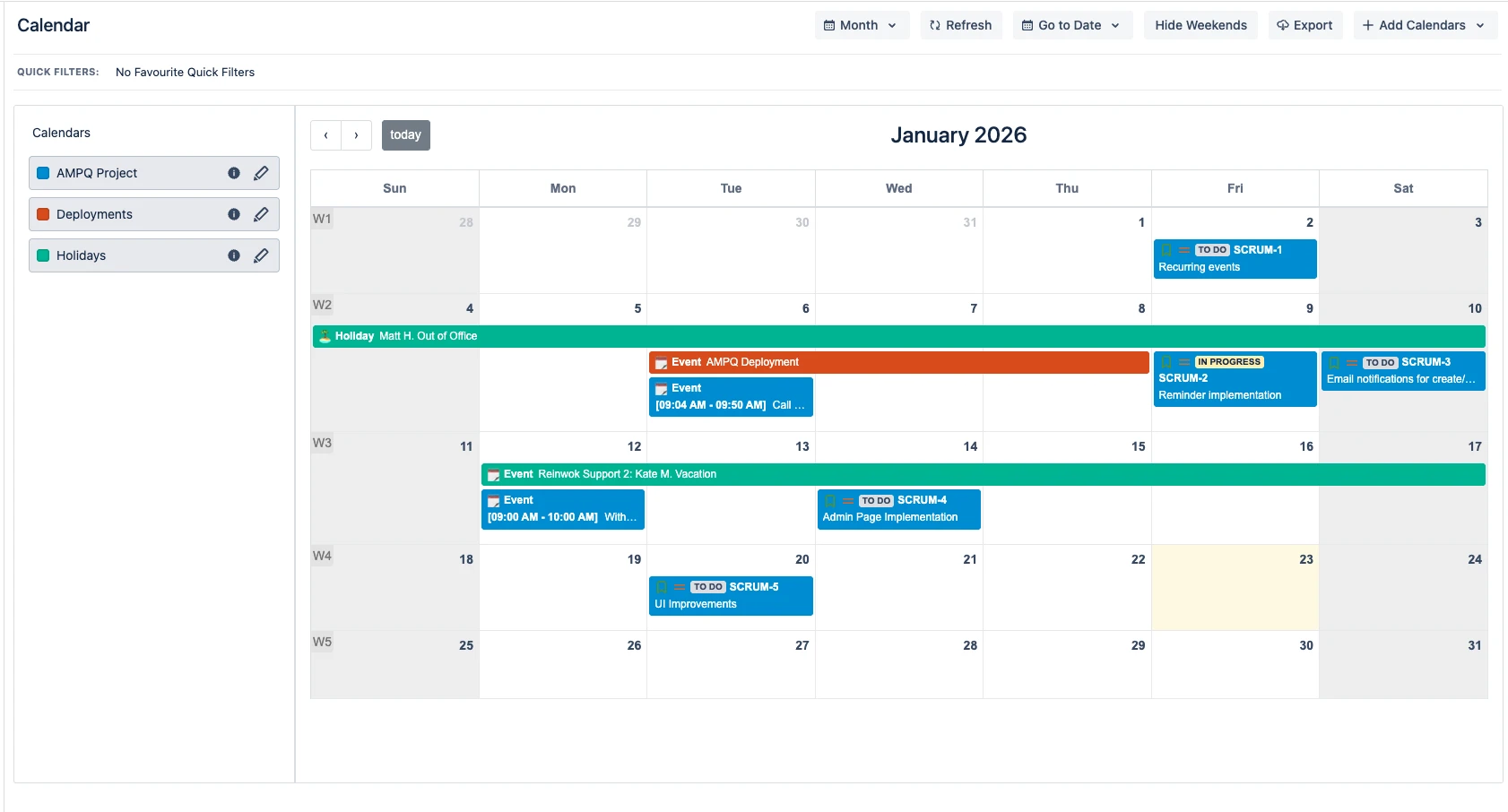
Calendar month view with Jira issues, custom events, and quick filters
Resource Timeline Module
The Resource Timeline provides a Gantt-style view where Jira issues and custom events are grouped by resources — Assignee, Project, Sprint, Epic, Fix Version, Component, or any Custom Field. Teams can view timelines across 7 time scopes: Day, Week, Month, Quarter, Half Year, Year (daily), and Year (monthly).
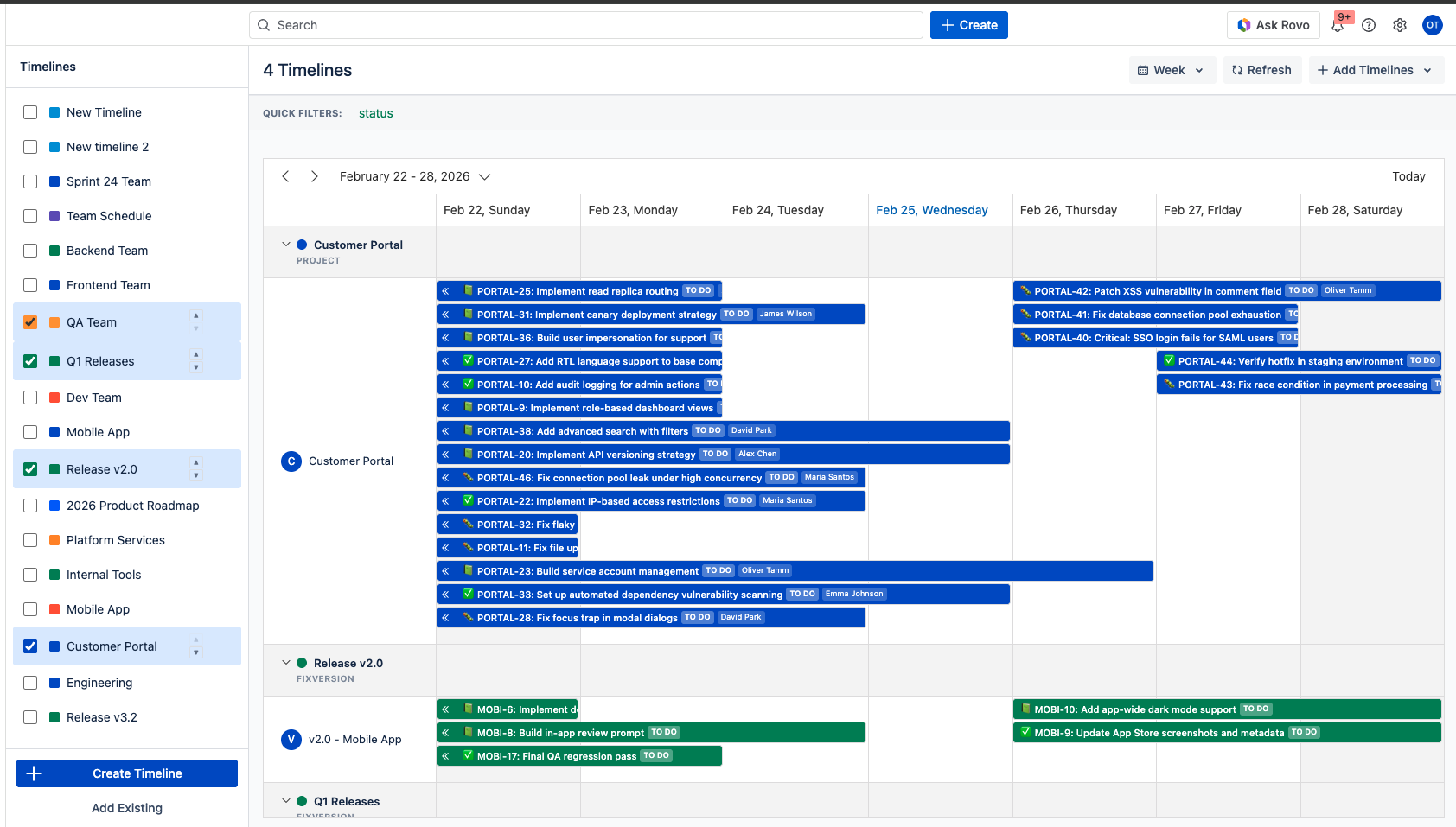
Resource Timeline with issues grouped by assignee across a monthly view
Multiple timelines can be displayed side-by-side, each with its own source configuration and color scheme. This helps when managers need to see multiple projects or departments at a glance.
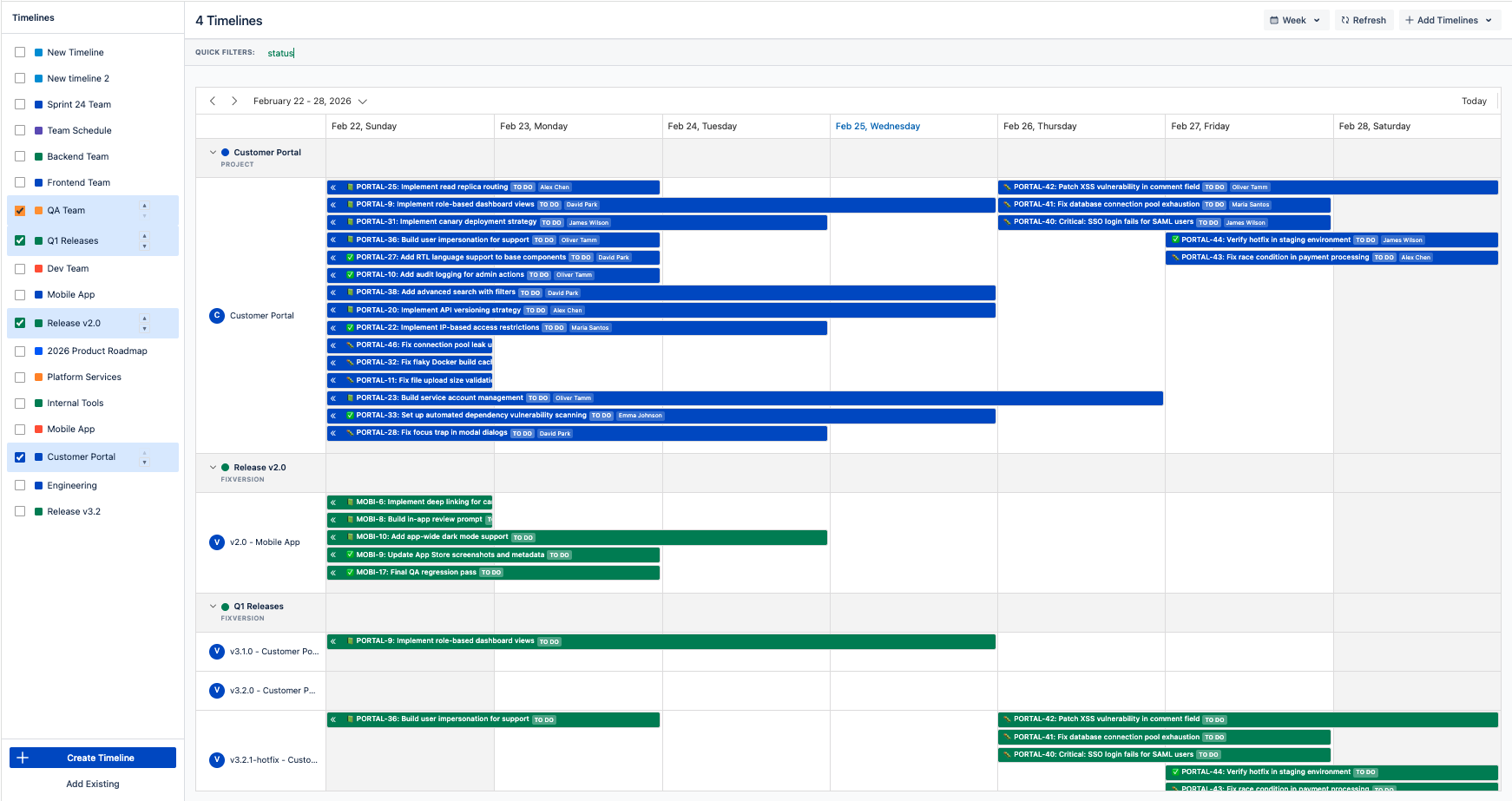
Multi-timeline view for cross-team coordination
Cross-Timeline Scheduling
One of the more practical features for day-to-day planning: when you drag an issue from one timeline to another, the corresponding Jira field is updated automatically. The behavior depends on how the timeline is grouped:
- Grouped by Assignee: dragging an issue to a different assignee’s row reassigns it in Jira
- Grouped by Sprint: moving an issue between sprint rows changes the issue’s sprint
- Grouped by Fix Version: moves the issue to the target release version
- Grouped by Component: updates the issue’s component
- Grouped by Epic: re-parents the issue under a different epic
Issue Planner Sidebar
The Issue Planner opens as a side panel where you can search for Jira issues by text or JQL, then drag and drop them directly onto the timeline to schedule them — setting the resource, dates, and assignment in one motion.
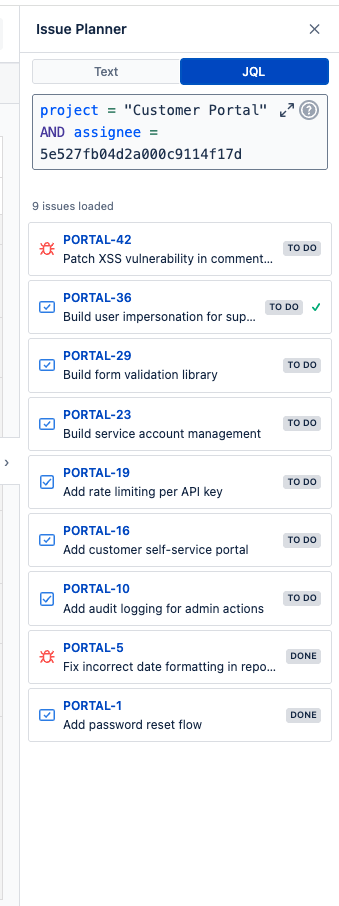
Issue Planner sidebar — search via JQL and drag issues onto the timeline
Custom Events with Linked Jira Issues
Custom events support rich text descriptions, participants from Jira users, external links, and configurable event types (holiday, meeting, travel, bug, etc.). Events can be linked to Jira issues bidirectionally — linked issues appear as a badge on the calendar/timeline entry, and linked events appear on the Jira issue panel.
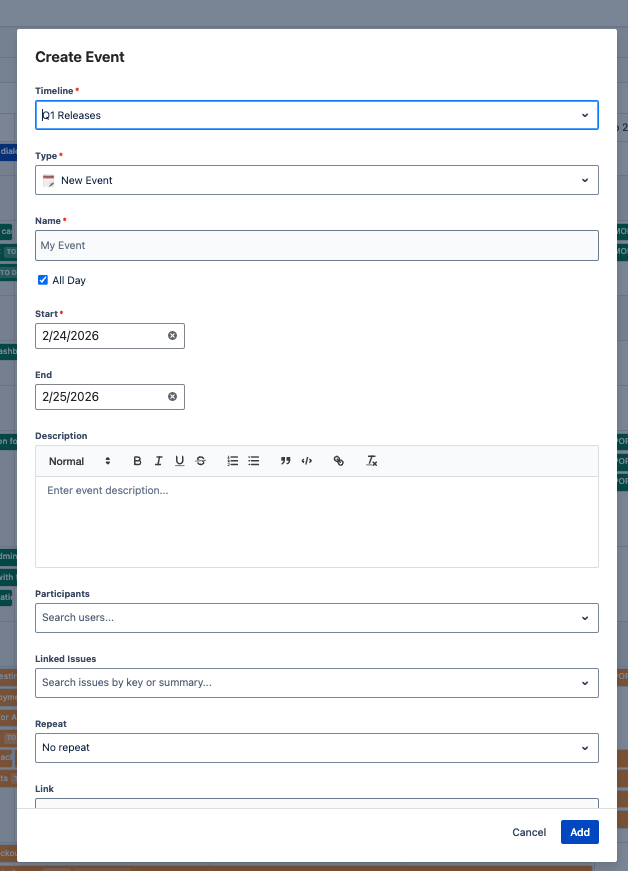
Custom event on the timeline with event type icon and linked issue badge
Jira Issue Panel
A Linked Events panel appears directly on Jira issues, showing all custom events linked to that issue. From the calendar you see which issues are linked to an event; from any issue you see which events reference it.
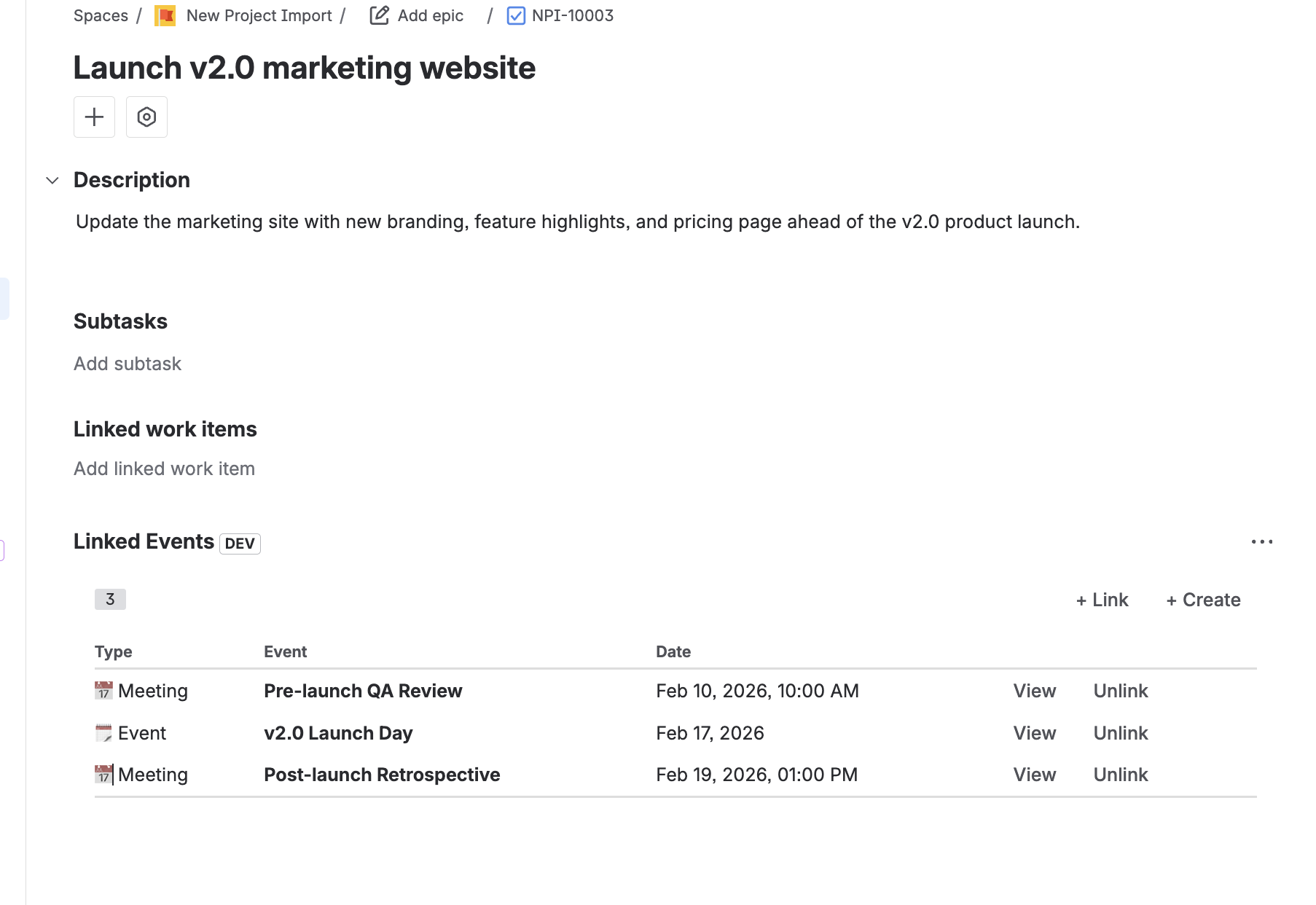
Jira issue panel showing linked custom events
Dashboard Gadgets
Two dashboard gadgets are included: a Calendar gadget for embedding calendar views on any Jira dashboard, and an Upcoming Events gadget that shows a compact list of upcoming events and issues.
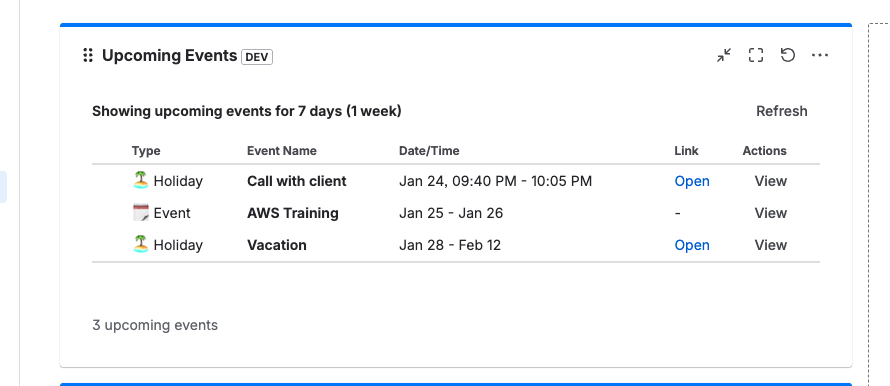
Upcoming Events gadget on a Jira dashboard
JSM Portal Calendar
If your organization uses Jira Service Management, you can now embed calendars directly into your customer-facing portals and the Help Center — no extra plugin needed. This is useful for sharing maintenance schedules, release dates, team availability, or any public events with customers who may not have a Jira license.
- Help Center & Portal support — display calendars on the Help Center home page or on specific Service Desk portals
- Anonymous access — custom events are visible to everyone, including unlicensed and anonymous visitors. Jira issues are only shown to logged-in users with Jira access.
- Month, Week, and List views for customers to browse upcoming events
- Read-only — customers can view events but cannot create or modify them
- Dark mode support — adapts to the portal theme automatically
- Multiple calendars per portal — assign different calendars to different portals, up to 10 locations
Because Calendar for Jira runs on Atlassian Forge, the portal calendar data stays within Atlassian’s infrastructure — it is never sent to external servers, even when viewed by anonymous visitors.
Use Case: IT Service Desk
An IT team can create a “Planned Maintenance” calendar and publish it on the Help Center. Customers visiting the portal immediately see upcoming downtime windows without needing to submit a ticket or log in.
Other Notable Features
- Google Calendar sync, Outlook import/export, and ICS feeds — sync your Jira calendar with Google Calendar, import/export to Outlook, or subscribe via standard ICS feeds, all while keeping data within the Atlassian ecosystem
- PDF & Excel export for sharing schedules outside Jira
- 3-tier permissions: Admin, Use, Read Only — per calendar and per timeline
- Email reminders with configurable intervals (at time of event, 5 min to 1 week before)
- Forge-based architecture: runs on Atlassian’s own infrastructure, so your data never leaves the Atlassian ecosystem and is not accessible by external servers
Limitations
- No email invitations — event participants are notified via Jira reminders, not email invites.
Doitb Calendar for Jira
Doitb Calendar for Jira is one of the most established calendar plugins on the Atlassian Marketplace, with over 3,000 installations. Its main strength is external calendar integration — syncing Jira dates with Google Calendar, Outlook, and other tools. It runs on the Connect framework, meaning the app is hosted on the vendor’s own servers.
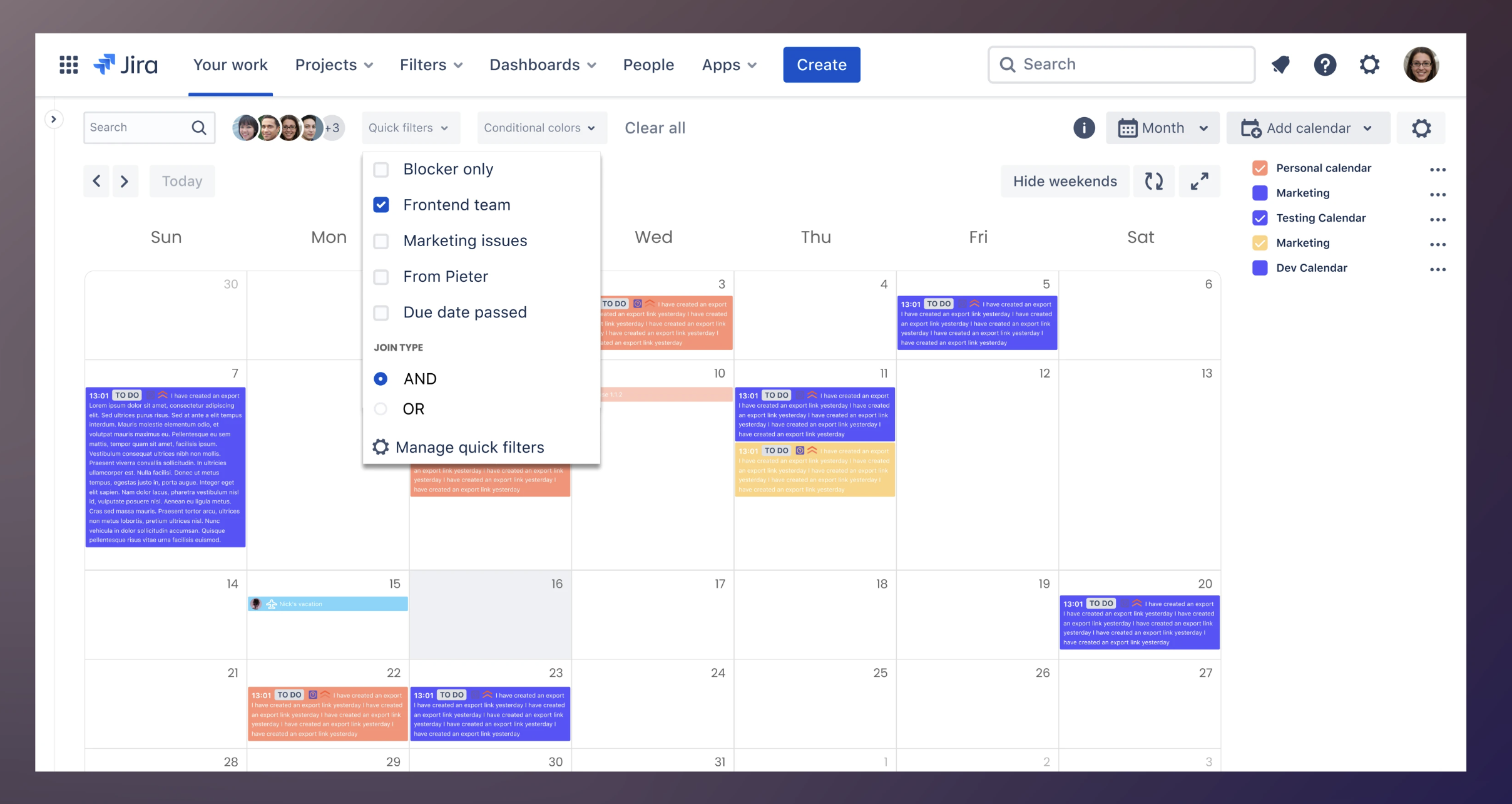
Doitb Calendar for Jira — month view with quick filters and color-coded calendars
View Doitb Calendar for Jira on Atlassian Marketplace
Views & Calendar Types
Doitb Calendar for Jira offers 5 views: Day, Week, Month, Quarter, and Agenda. It supports 6 calendar source types: Basic (non-Jira events), Project, JQL, Filter, Board, and Subscription (external ICS feeds). The Board-type calendar and Subscription calendars are particularly useful — no other plugin in this comparison offers them.
External Calendar Integration
Doitb Calendar for Jira offers 2-way Google Calendar sync, ICS export for Outlook and Apple Calendar, a JSON feed for developer integrations, and the ability to generate a public calendar URL. If your team specifically needs Jira dates to appear inside Google Calendar, this plugin supports that workflow.
Worth noting: Doitb Calendar for Jira uses the older Connect framework, which means the app runs on the vendor’s own servers. Your calendar data — including issue titles, dates, and descriptions — is processed outside the Atlassian ecosystem. For teams with strict data governance or compliance requirements, this is an important consideration.
Other Features
- Drag-and-drop task rescheduling (when date fields are editable)
- Color-coding by user and conditional calendar rules
- Jira project versions displayed on calendars
- Dashboard gadget (supports up to 10 calendars per gadget)
- JSM (Jira Service Management) portal integration — embed calendars on customer-facing portals
- Calendar sharing with specific users or making them private
- Export security controls for admins
Limitations
- Connect framework — data is processed on the vendor’s servers, not within Atlassian’s infrastructure
- No resource timeline — DoItB offers “Timeline for Jira” as a separate product with its own pricing
- No PDF or Excel export — export is limited to ICS and JSON formats
- No linked issues on custom events
- No multi-language support
- No free tier — starts at $2.00/user for teams up to 10
Event Calendar for Jira (Aldeva Digital)
Event Calendar for Jira by Aldeva Digital has around 2,300 installations. It is the simplest of the three — a straightforward calendar for teams that need event management in Jira without the overhead of resource planning or complex configurations.
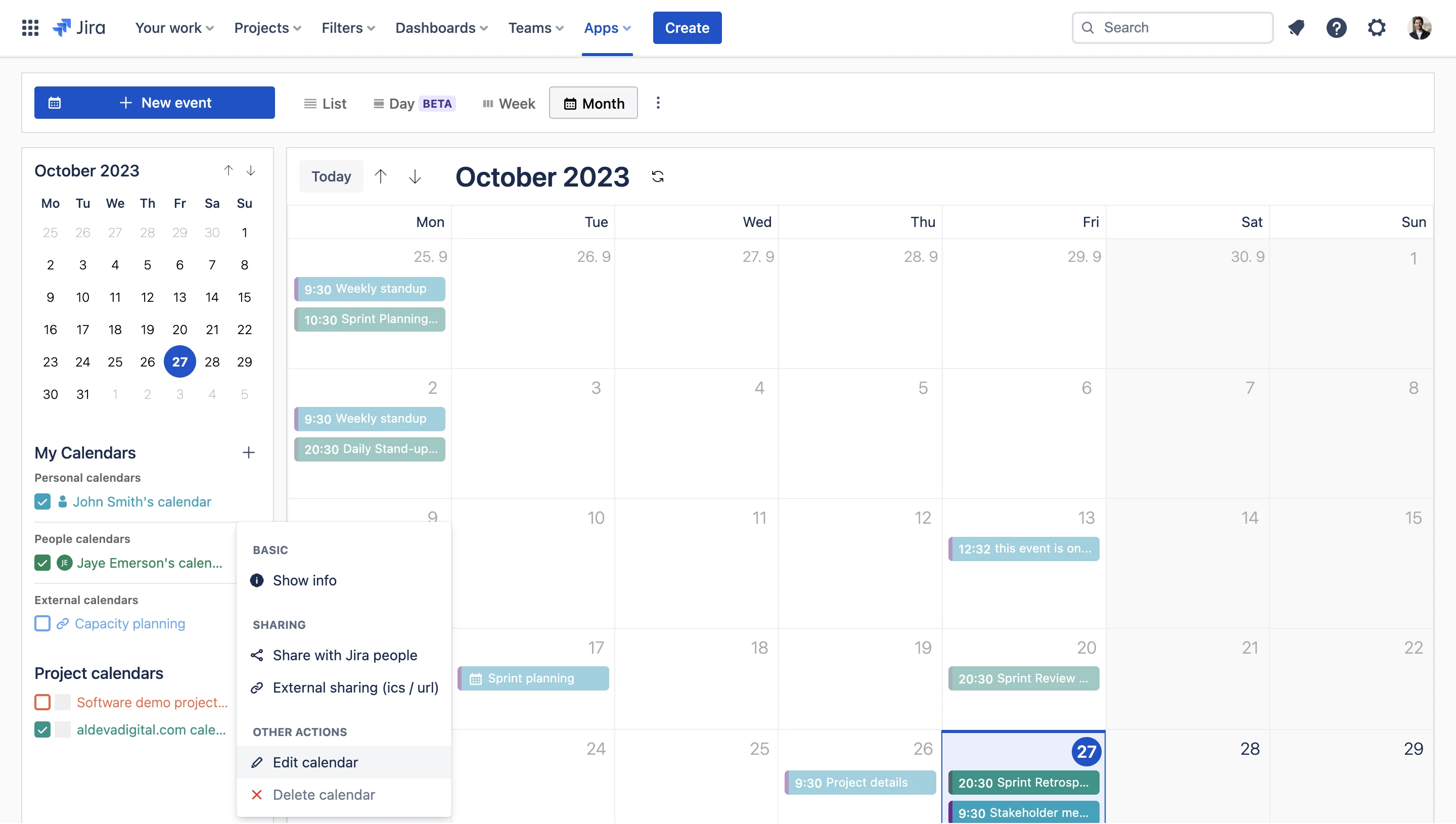
Event Calendar for Jira — month view with project calendars and calendar sharing
View Event Calendar for Jira on Atlassian Marketplace
Views & Features
Event Calendar offers 3 views: Day, Week, and Month. Events can be created with custom types (holidays, vacations, out-of-office), and the plugin supports recurring events on a weekly, monthly, or yearly basis.
Strengths
- Email invitations: Send event invitations directly to participants — a feature neither of the other two plugins offers
- External calendar sync: Import from Google Calendar, Outlook 365, and ICS URLs; export to the same destinations
- Data residency: US and EU hosting options for compliance-sensitive teams
- Auto-generated project calendars from Jira projects
- Simple setup, minimal learning curve — good for teams that just want a calendar overlay without configuring timelines or resource groups
Limitations
- Fewest views — only Day, Week, Month (no Quarter, Agenda, or Timeline)
- No resource planning or timeline
- No drag-and-drop issue rescheduling
- No JQL-based filters
- No PDF or Excel export
- No multi-language support
- Highest starting price ($4.53/user for teams up to 10)
Pricing Comparison
All prices below are monthly per-user rates from the Atlassian Marketplace as of March 2026. Marketplace apps are billed annually, so these are the monthly equivalents.
| Team Size | Calendar for Jira (Resource Timeline & JSM Calendar) | Doitb Calendar for Jira | Event Calendar (Aldeva) |
|---|---|---|---|
| Up to 10 users | FREE | $2.00 / user | $4.53 / user |
| 11 – 100 | $0.40 / user | $0.70 / user | $0.45 / user |
| 101 – 250 | $0.25 / user | $0.60 / user | $0.38 / user |
| 251 – 1,000 | $0.25 / user | $0.55 / user | $0.32 / user |
| 1,001 – 2,500 | $0.25 / user | $0.45 / user | $0.29 / user |
| 2,501 – 5,000 | $0.10 / user | $0.35 / user | $0.27 / user |
| 5,001 – 10,000 | $0.10 / user | $0.26 / user | $0.24 / user |
| 10,001+ | $0.01 / user | $0.14 / user | $0.21 / user |
Calendar for Jira is the lowest-cost option at every tier. For a 100-person team, that is $0.40/user vs. $0.70/user (Doitb Calendar for Jira) or $0.45/user (Event Calendar). Calendar for Jira’s price includes the calendar, the resource timeline, and the JSM Portal Calendar — all in one app. Doitb Calendar for Jira’s timeline is a separate product with its own pricing.
Data Security: Forge vs. Connect
This is an important distinction that affects where your data lives. Calendar for Jira is built on Atlassian Forge, meaning it runs entirely on Atlassian’s own cloud infrastructure. Your data — issue titles, event descriptions, dates, participants — never leaves the Atlassian ecosystem and is not sent to or accessible by any external servers.
Doitb Calendar for Jira and Event Calendar for Jira use the older Connect framework, where the app logic runs on the vendor’s own servers. This means your calendar data is transmitted to and processed by third-party infrastructure. For teams with strict data governance, compliance requirements (SOC 2, GDPR, etc.), or security policies that restrict third-party data access, this is a significant consideration when choosing a plugin.





Trusted by teams at Tesco, Volkswagen, Nintendo, Wayfair, and Experian
Summary
All three plugins add calendar functionality to Jira, but they serve different needs. Event Calendar is the simplest option for basic event management with the smallest learning curve. Doitb Calendar for Jira offers Google and Outlook sync, though your data will be processed on external servers.
Calendar for Jira (Resource Timeline & JSM Calendar) goes further: it combines a full calendar with a resource planning timeline, cross-timeline scheduling that updates Jira fields directly, bidirectional event-to-issue linking, Google Calendar sync, Outlook import/export, ICS feeds, and a JSM Portal Calendar for sharing schedules with customers — all running on Atlassian Forge where your data stays within the Atlassian ecosystem.
We recommend trying the free tier or evaluation period for each plugin to see which fits your workflow. Every team is different — the right choice depends on whether you prioritize resource planning and data security, external calendar sync, or simplicity.
Try Calendar for Jira (Resource Timeline & JSM Calendar)
Free for teams up to 10 users. Calendar, resource timeline, and JSM Portal Calendar — all included.
View on Atlassian MarketplaceRead the documentation